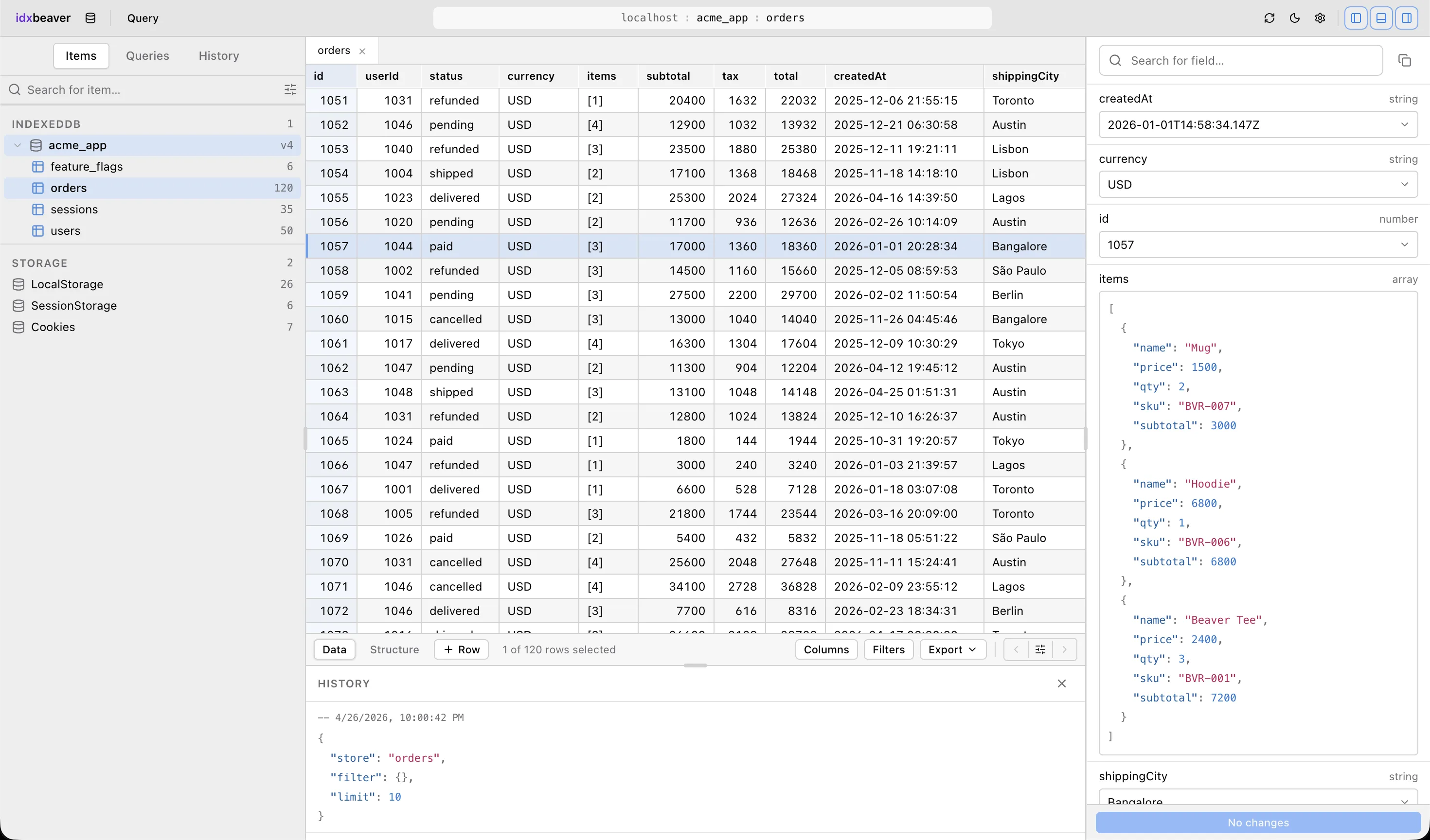
IdxBeaver is a Chrome DevTools extension that gives IndexedDB a real database client (source). Queries return rows. Rows go into a grid. The grid is the part of the UI users spend the most time staring at — and it has to do four things at once, none of which are the same problem.
What the Grid Actually Has to Do
- Virtualize. A query can return up to 5000 rows. Rendering them all is a non-starter inside a DevTools panel where every paint competes with the page being inspected.
- Pin and reorder columns. People want
idandkeyglued to the left while they scroll horizontally. - Edit cells in place with Tab / Shift-Tab navigation, undo/redo, and a context menu.
- Stay out of the way of shadcn/ui — the rest of the panel is built on shadcn primitives and Tailwind, and a grid library that ships its own CSS-in-JS or a giant theming system would fight that.
That last one is what eliminated almost everything.
The Libraries That Didn't Fit
AG Grid is excellent. It also ships its own DOM, its own styling system, and a license boundary for some of the features I wanted. Column pinning is community, but a few of the features further down the wishlist sit on the enterprise side — wrong shape for an MIT-licensed extension.
Handsontable has a commercial license for non-trivial use. Same problem, different vendor.
Glide Data Grid renders to canvas. Fast, but integrating shadcn's <ContextMenu> and an editable cell with the keyboard semantics I wanted would have meant either reimplementing them on top of canvas or stitching DOM overlays on top of the canvas surface. Neither is the path of least resistance for a grid that needs to feel native to the rest of the panel.
What's left is the headless category, and TanStack Table is the unambiguous choice there.
Headless Was the Deciding Factor
TanStack Table doesn't render anything. It manages column order, pinning state, the row model, and selection — and hands you back a state object you turn into your own DOM:
const table = useReactTable({
  data: rows,
  columns,
  state: { columnOrder, columnPinning },
  onColumnOrderChange: setColumnOrder,
  onColumnPinningChange: setColumnPinning,
  getCoreRowModel: getCoreRowModel(),
});

const virtualizer = useVirtualizer({
  count: table.getRowModel().rows.length,
  getScrollElement: () => scrollRef.current,
  estimateSize: () => 24,
  overscan: 8,
});
The grid renders shadcn-styled rows. The context menu is a <ContextMenu> from the same library that powers the rest of the panel. The cell editor is a plain <input> I wrote in fifteen lines. None of those decisions had to negotiate with the table library, because the table library has no opinion on any of them.
The other half of the win is that @tanstack/react-virtual is by the same author. The state shapes compose. The row model TanStack Table produces is exactly what useVirtualizer wants to count. There's no glue layer between "I have rows" and "I'm only painting the visible ones."
The Trade-Off You Pay For Headless
I had to write the column resize handles, the keyboard navigation between cells, and the edit-commit machinery myself. For a generic CRUD admin, that's a tax. For a DevTools-grade UI it's the opposite — those are exactly the parts a generic library tends to get subtly wrong.
A few examples of what "subtly wrong" looks like in practice:
- Edit-on-Tab: when the user Tabs out of an editing cell, do you commit and move, or commit and stop? IdxBeaver commits and moves to the next editable cell in the row, skipping the pinned key column. A generic grid would do whatever its author thought was reasonable.
- Undo across edits: cell edits push
UndoCommandentries onto a capped stack so⌘Zreverts the lastputRecordround-trip — including across cells in different rows. The grid doesn't know about this. It just renders whatever the panel's state says. - Draft rows for inserts: a new row isn't a "real" row until the user commits it. It lives in a separate state slot from
rows, gets rendered at the top, and disappears on Escape. A library that owns the row model would have to be told about that.
Each of those is twenty lines of code. None of them would survive a library upgrade if I'd let a heavyweight grid own the DOM.
What I'd Do Differently
The cell-render logic grew organically and ended up split across DataGrid.tsx, cells.ts, and inline flexRender calls. If I were doing this again I'd commit harder to the TanStack pattern and put every cell-type renderer behind a single cell: field on the column def from day one.
The virtualizer's estimateSize is hard-coded to 24px, which matches the row height in CSS. That's fine until someone wants a denser or roomier mode — and the moment that becomes a setting, the estimate has to come from a measured value. Easy enough to fix once it matters; trivially easy to forget about until a row-height regression makes the whole grid jitter.
The Broader Lesson
Picking a UI library is mostly about who owns the DOM. If the library owns it, you're going to fight it the moment your app's design system has its own opinions. If you own it, you're going to write more code — but the code you write is exactly the code that makes your product feel like itself.
For an extension whose entire pitch is "feels like a real database client," letting a third party own the grid's DOM was never going to work. Headless was the only answer.